This post is meant for first-time writers of academic articles. The advices and rules presented in this post are opinionated and reflects my own experience. Some advices have been taught to me by my supervisor, learned in books, or designed as personal guidelines.
At the end of the day, I believe that on top of following common rules, writing good academic paper required to develop your own style and an ear for good sentences (term borrowed from Lyn Dupré [1]). You can read as much as you want about it but experience is important.
So start writing, don’t lose hope, be critical of your work, seek reviews and advices from others, and you will get there eventually.
The Zen of Writing
- Do not try to impress people.
- Be honest.
- When in doubt, make it consistent.
- Present facts, not opinions.
- Assume your reader is inexperienced and motivated to learn.
- Find someone willing to review your articles and never let them go.
Casus Belli Shortlist
- “big”, “small”, “high”, “good” are empty meaningless words.
- “Impact” describes a physical collision between objects. Prefer “Influence”, “Effect” or “Affect”.
- If a figure is not referenced, it might as well not be in paper.
- If there is no content between headings then the headings are wrong.
- If you feel compeled to use bold and italic on some words, resist the urge and write better sentences.
- “In other words […]” means that you did not explain it correctly in the first place.
Bibliography
Citing other works is mandatory for any article.
Create a file biblio.bib next to you LaTeX file and fill it with all your references in bibtex format.
At the end of your article, import your bibliography and set the reference style with
\bibliography{biblio} % Import the bibliography
\bibliographystyle{plain} % set the reference style
You can now cite any item from your bibliography in your article with the cite command.
Grisel-Davy et. al. proposed a radically new approach~\cite{grisel}.
You may notice the
~symbole that links the previous word and thecitecommand. In LaTeX, the tilde (~) symbole represent a non-breaking space. The tilde prevent LaTeX from splitting the line between the previous word and the inserted “[1]”, which could confuse the readers.
There is no requirement for references numbers to be in order. Let LaTeX order the references as it sees fit.
Figures
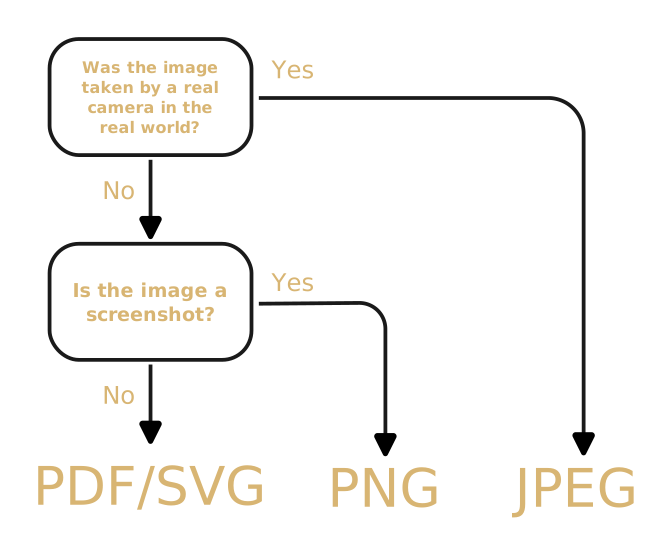
As much as possible, use vector images (svg, pdf, eps). There are very few cases where using raster images is acceptable. Here is how to decide:
Rules of thumbs For Good Graphs
Designing good graphs that clearly convey the intended information is hard; like really really hard. Talented people have written books and books on this subject. Needless to say that I will not summarize it in two-paragraphs.
There are however some comon pitfalls that are easy to avoid to make your graphs better.
Colors
Color are great but they should never be mandatory to understand the graph for two main reasons. First 8% of men and 0.5% of women are color blind [2]. Even if they can differentiate some colors, your graph may not look the same for them. This is easy to avoid by choosing color palettes that are color blind friendly. I personally like Paul Tol’s Bright color palette but feel free to find others.
Here is a python dictionary of the Bright color palette so you don’t have to make it yourself.
tol_bright = {
   'blue': '#4477AA',
    'red': '#EE6677',
    'green': '#228833',
    'yellow': '#CCBB44',
    'cyan': '#66CCEE',
    'purple': '#AA3377',
    'grey': '#BBBBBB'
}
The second reason is that people may print your paper on a greyscale only printer of view it on a grayscale only device. For this reason, you have to make sure that the chosen colors are differentiable in greyscale. Keep in mind that colors are not the only tool to represent differences in your data. Line styles, markers, hatches or added symboles like circles, rectangles or arrows are all useful tools to make your graphs legible without colors.
Text
Like in any figure, the texts in a graph should be the legend. Any additional information that you may want to write on the graph is likely better placed in the text. This applies to title; they are most often superfluous. The rule for test is to make it big enougth that the reader can comfortably read it without zooming in.
Caption
The caption of any figure should be enougth to fully understand all the information presented in the graph and provide the key takeway. Most reader start by glancing at the figures in a paper to decide it thay want to read it. These readers should have all information they need in the caption of each figure. Do not hesitate to have multi-lines captions.
Reference
Any figure in the paper must be referenced somewhere in the text.
Never assume that a figure will be at the exact place where you put the figure code because LaTeX, by default, finds the best place for it automatically.
For this reason, you should avoid relative position like “the figure above” or “the next figure” that are ambigous at best and missleading at worst.
Instead, keep it simple and consistent and always reference the Figure you are describing with the ref command.
Figure~\ref{fig:results} illustrates the influence of new environment on the results.
Notice that, as for the citations,
refcommand should be linked to the previous word with a non-breaking space~.
A common mistake is to not capitalize the term
Figurewhen referencing one. I am not wure why this convention exists but it is now common practice and expected by the reader so you should folow it. Terms likeFigure,Table,SectionorChaptershould always be capitalized when referenced.
Acronyms
All acronyms in you paper must be defined at some point, and this point should be when they are used for the first time.
Defining acronyms by hand and keeping track of when they are first used is certainly possible but also error prone.
I recomend you use a package like acro to take care of acronyms definitions for you.
Define any acronym you want to use in a separate acronyms.tex file, import it with \input{acronyms}, and call the acronym with \ac{...} in the text.
Now you never have to worry about acronym definition ever again.
References
[2] Wikipedia