Making an Energy Harvesting Circuit
This project is heavily inspired by the light energy harvesting sensor created by Pocket Concept about nine months ago. His circuit harvests the energy from a single diode to send temperature measurements every few seconds. Pretty cool! For my project, I would like to scale up the input power by using a few diodes in parallel and find another application for the power. I would like to find an application that stays on the PCB, maybe displaying some kind of sensor value, to be decided.
Step One: Make a Plan
I started from the information shared by Pocket Concept for the energy harvesting circuit. I will be using the same BQ25504 boot converter along with a few of the same BPW34 diodes and a bank of capacitors. For the load, I wanted to learn some proper embedded system design so I decided to use an STM32 Microcontroller Unit (MCU). There are A LOT of STM32 version but after watching some explanation video I decided to use the STM32U3 line as it seems to be their latest low-power model. The exact model I picked is STM32U375CET6Q. Now I need to decide what this MCU will do. I want to display some information but every display takes too much power. Eink seems like a good option but refreshing an eink display takes quite a bit of power and a lot of complexity that I am not sure my MCU can handle.
Yes I know it can and I know using Eink is possible, I simply mean I cannot make it work. This is not my job and I have limited time to dedicate to it so simple and safe beats cool and complex.
But there is a simple way to display information without a display. The electronic equivalent of using print statements for debugging: a bunch of LEDs! So I will connect five low-power LEDs to the General Purpose Input/Output (GPIO) pins of the MCU and we’ll see later what they will do.
For the capacitor bank, I am aiming for ~50mF. I don’t know enough about capacitors to truly evaluate if this is optimal but it seems reasonable to power the MCU for around 1s. My hope is that the MCU can remain ON all the time but drop to a deep sleep mode to let the capacitor recharge so I can retain the variables. Worst case the MCU shuts down at every charge cycle and I’ll deal with it in software.
Harvester Circuit
Let’s start with the harvester circuit. There are four parts of interest that I will try to explain as clearly as possible.
1. The Cells
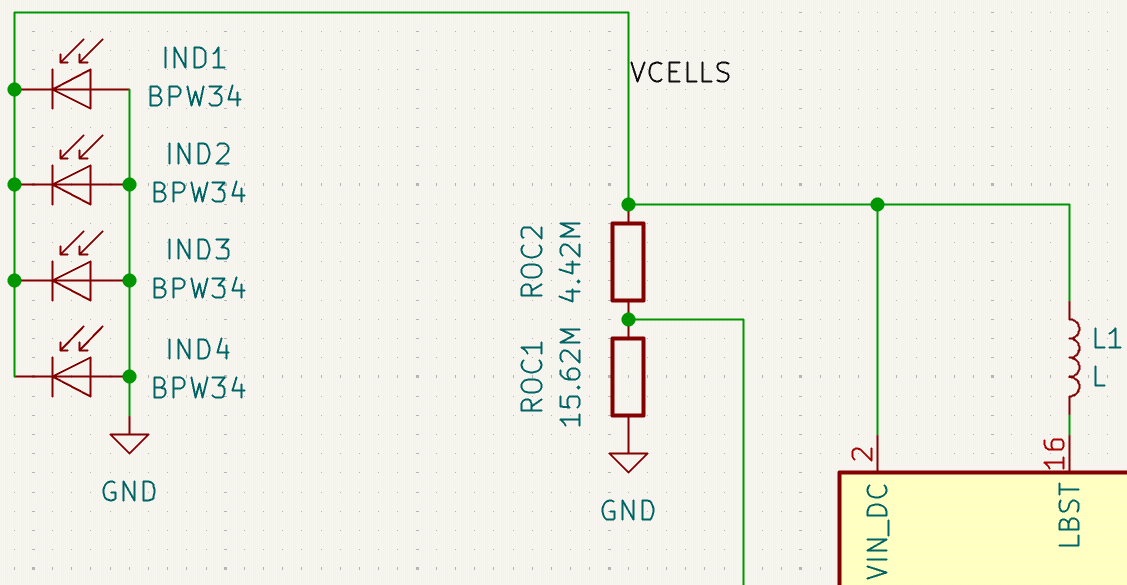
The cells are BPW34 light cells that convert light into voltage. I am planning to use four in parallel to get a better input power. Theoretically I should place diodes to avoid having one highly illuminated cell back-power a shadowed one but diodes mean loss and since the cells are so small I decided they will always receive similar light levels.
The cells are wired in parallel and connected to the VIN_DC pin of the boost converter.
2. Voltage Levels
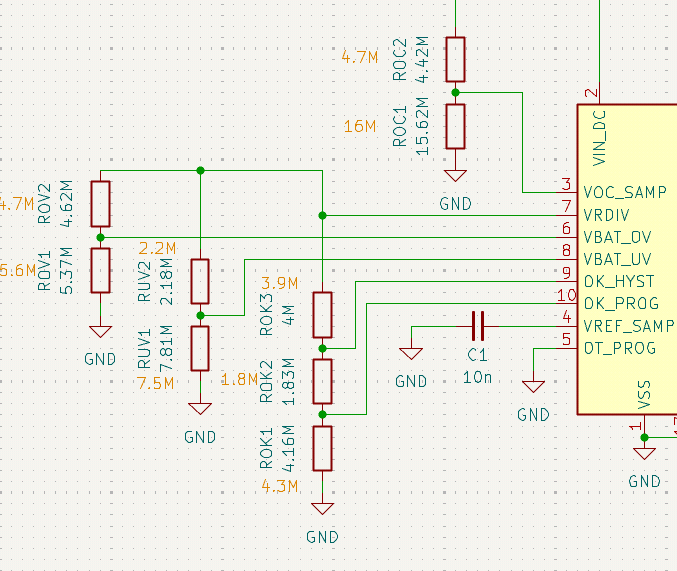
ROC, ROC, ROK, the BQ25504 has a lot of voltage levels that need to be programmed using bridge dividers. For most, the high voltage is set at 1.25 by the VRDIV pin. For ROC, it is the input voltage VIN_DC that is the high side.
ROC is the exception and sets the Maximum Power Point Tracking (MPPT) value. To be honest I don’t know enough about MPPT to really understand what it is used for but the doc says to set it around 70-80% for solar inputs.
The other ones are grouped in two categories.
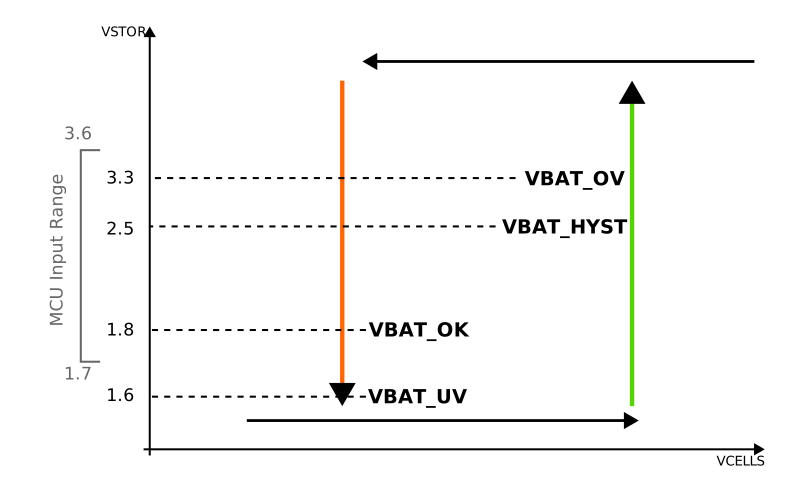
ROV and RUV sets the over and under voltage values OV and UV.
When the VBAT goes above OV, the converters stops charging it.
Similarly when VBAT goes below UV, the output VSTOR is disconnected from VBAT to avoid discharging the battery too much (which can be an issue for some battery types).
The ROK resistors sets the behavior of the VBAT_OK output.
VBAT_OK is a signal that can be used to determine when the stored energy is safe to use. VBAT_OK is not fully binary but rather capped by VSTOR so the “high” value might decrease when the energy is used and the voltage across the capacitor decreases.
The converters provides a way to define a hysteresis behavior on the VBAT_OK signal to keep the system on only when the voltage is safe to use.
Obviously the perfect resistor values are not standard values so I got the closest ones available (in orange on the schematic).
3. The Capacitors
Not much interesting here. I selected one big 47mF capacitor for bulk storage and one small 100u for absorbing the ripples (apparently it is a good idea, I am following the datasheet on this one).
4. VBAT_OK Logic
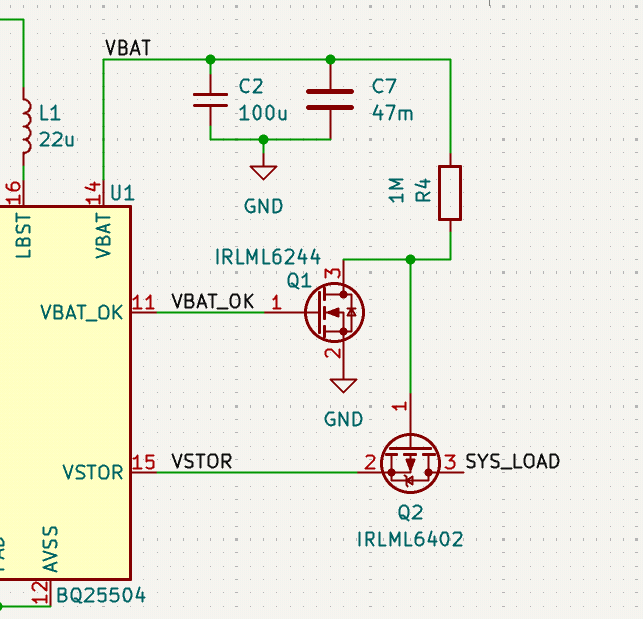
Ideally I would slap a transistor between VBAT_OK and VSTOR and call it a day. However the issue is that VBAT_OK is at the same value as VSTOR so we need to use a transistor driver to make it work.
I was on the lookout because Pocket Concept missed it and had to fix it on the PCB. Shoulders, giants, etc…
Here is the intuition. We want a transistor to connect VSTOR to the system. However VSTOR is close to the highest voltage we have around so we cannot use a N-channel.
Thus, we go with the weird one nobody understands, the P-channel transistor.
Cool we have a transistor that can connect VSTOR to the system when the input is low.
Problem is, our signal VBAT_OK signals to connect when it is high, so we need a way to reverse it.
Good news, N-channel transistors are good at that. Connect VBAT_OK to the input and ground on one side and now when VBAT_OK is high the other side is connected to ground.
Last step is to connect the non-grounded side to a pull-up resistor and this is our inverted signal.
It always feels weird to just connect high to ground through a resistor, especially in a power-constraint circuit, but with a 1M resistor the loss is negligeable.
MCU Circuit
The MCU circuit is very very simple because I have no idea what I am going to do with it yet. The main goal here is to power the thing, program the thing, and blink some LEDs. Anything more than that is a bonus.
1. Power the thing
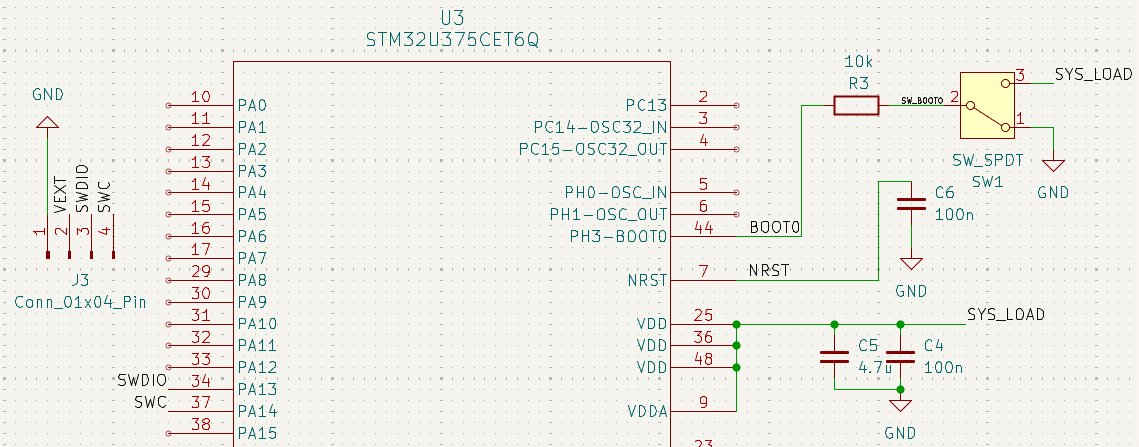
The Power the MCU, you give it between 1.71V to 3.6V on the VDD pins and connect the grounds to ground. It is as simple as that. The voltage of the SYS_LOAD net should always remain between that range because of the very smart array of resistors we setup to control VBAT_OK so the only thing left is to add some decoupling capacitors (you can never trust these input voltages).
2. Program the thing
This is where things gets blurry because I have never done that before. As far as I understand, there are two pins of interest on the MCU that are related to flashing. NRST controls the reset mode. As the name indicates, triggering the reset pins resets the MCU to a clean state and restarts the program. When writing this explanation I realized I should have kept this option because I cannot easily remove and apply power to the MCU but I did not think of that at the time and I grounded the pin to avoid spurious resets. Todo for the next version I guess.
The other and more important pin is the BOOT0. This one controls booting from either flash (the flashed firmware) or the system memory that contains TI’s bootloader and is mainly used for flashing. Basically, it selects either flashing or normal mode. I connected this to a slide switch even though the programmer should be able to trigger a flash from the SPI connection, better play it safe for this first version.
Speaking of SPI connection, this is where the flashing happens from. Only two wires are needed (basic SPI setup) and I route that to a header to connect the programmer. This should be all that is needed for flashing something to the MCU.
3. Blink some LEDs
With only two pins used for the SPI connection, we are left with plenty of IO pins for controlling LEDs. I tried to stay reasonable and only attached five LEDs. This is very much just a proof of concept so I don’t need much. Each LED gets a 560Ohm resistor to limit current and we are good to go.
PCB
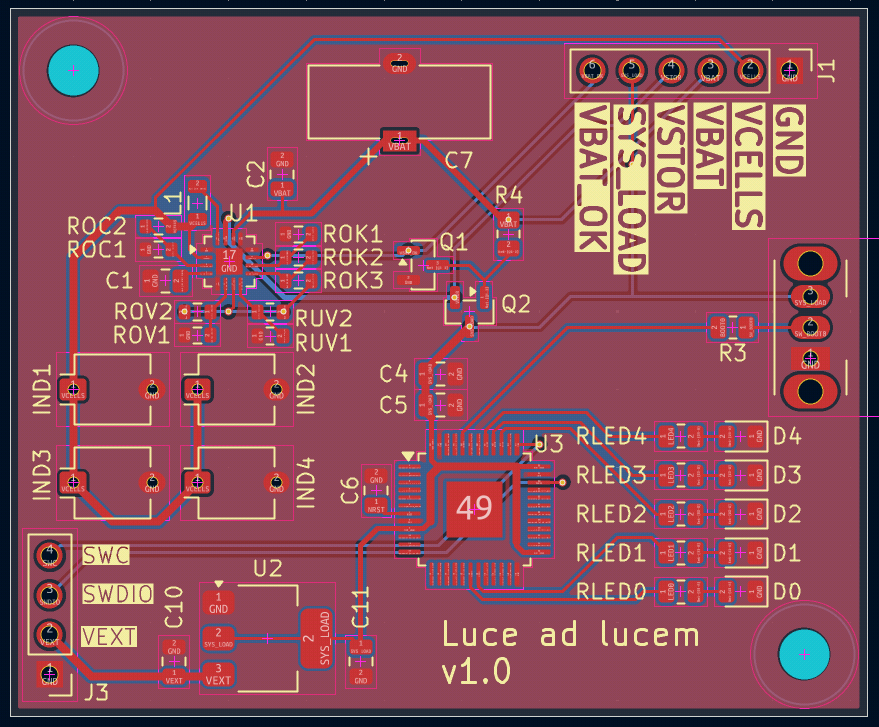
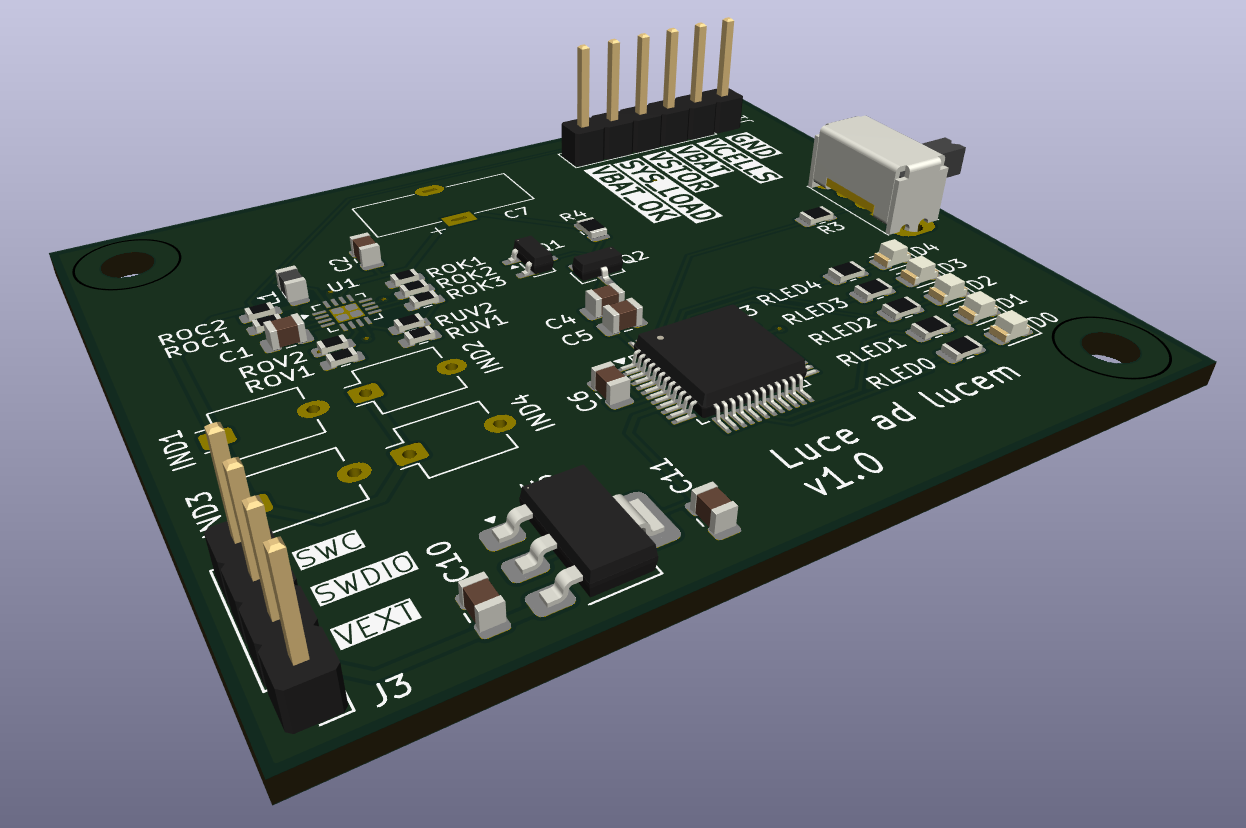
The PCB design is very classic. Slap all of the components on a small rectangular board (I did not even round the corners, disappointing), keep the solar cells together to avoid unbalance illumination, add fancy headers labels and some mounting holes. Done.
Next Step
Solder it and try: charging the capacitor, flashing the MCU, evaluate the battery life, optimize etc.